






Free Aura Player with 12M & 24M PlansClaim 24h Free Trial →
GalaxyIPTV Intergalactic 4K
Our #1 Recommended Cross-Platform & Smart TV Player
IBO ONE Logo

IBO ONE

The benchmark zero-typing IPTV media player across Android, Apple iOS, Apple TV, Mac, Smart TVs, and Windows PC. We configure your entire channel lineup remotely via your unique Device ID and Device PIN, so you never have to type long links or passwords!

Supported Platforms & Devices
Android Phone iPhone iPad Android TV / Google TV Apple TV LG webOS Windows Compatible Apple Silicon Mac Samsung TV
Direct Downloads & Store Links
iPhoneiPadApple TVMac (Apple Silicon)
Firestick / Android TV Downloader2533617
ACTIVATE YOUR IBO ONE ACCOUNT IMMEDIATELY
Step-by-Step 4K Remote Setup
Authentic 4K Smart TV Experience

IBO ONE in Action with GalaxyIPTV

See the clean, high-speed green interface of IBO ONE running smoothly on a modern 4K television with preloaded GalaxyIPTV channels, movies, and series.
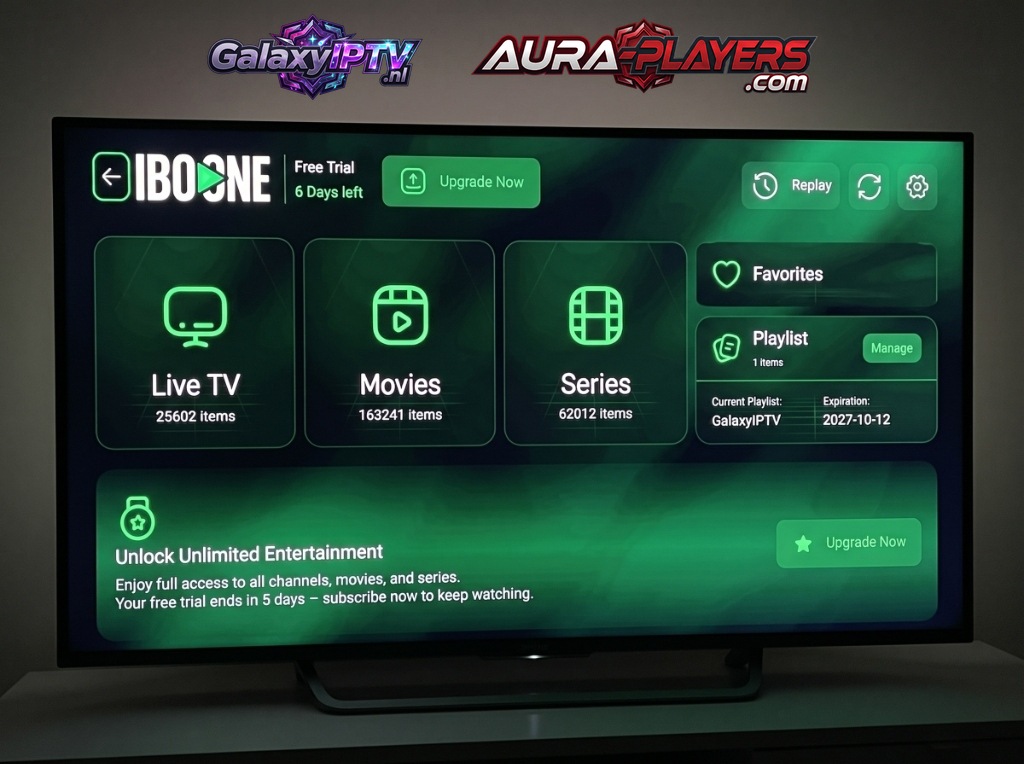
IBO ONE Media Player running live on a 4K Smart TV showing GalaxyIPTV playlist
Live Channels25,600+ Streams
VOD Movies163,000+ Titles
VOD Series62,000+ Episodes
Playlist SyncGalaxyIPTV Active

Why IBO ONE Is Our Top Smart TV Recommendation

Manually typing long M3U playlist URLs or portal credentials with a television remote control is tedious and error-prone. IBO ONE completely eliminates this hassle because we inject your playlist directly into your device via your unique Device ID and Device PIN.

Remote Setup via Device ID & Device PIN

When you open IBO ONE on your television or mobile device, you will immediately see a unique Device ID and Device PIN displayed on your screen. Simply enter them in our 3-step setup guide below or message them to us on WhatsApp, and we connect your Galaxy IPTV plan in under 2 minutes!

  • Instantaneous zapping between 4K UHD and Full HD channels
  • Intuitive electronic program guide (EPG) with 7-day catch-up replay
  • Official Windows PC native client for crystal-clear desktop streaming
  • Full parental lock controls and personalized favorites groups
  • Zero typing required: 100% remote activation with your Device ID & Device PIN
Official Certified IPTV Player
IBO ONE Official Player Logo

IBO ONE MEDIA PLAYER

Next-Generation High-Speed Streaming Engine

Zapping<0.4s Fast
Resolution4K UHD 60fps
SetupDevice ID & PIN
Complete Cross-Platform Ecosystem
Samsung TV LG WebOS Windows PC Android Phone & TV iOS & Apple TV Apple Silicon Mac
Easy Remote Configuration

How to Setup IBO ONE in 3 Easy Steps

Follow our 3-step setup guide below to install, note your codes, and connect your GalaxyIPTV lineup in minutes.

1

Install IBO ONE

Open the app store on your TV (Samsung Apps or LG Content Store), search for "IBO ONE" and click Install. On iPhone/iPad/Apple TV, search the Apple App Store. On Windows PC, download the direct installer above, or enter code 2533617 in Downloader on Android TV / Firestick.
2
0/7
0/7
FILL IN THE DATA FROM YOUR APP

Activate Your License

Launch the app to reveal your unique Device ID and Device PIN. Enter it on www.aura-players.com or send it directly to our technical flight crew via WhatsApp, after entering the player DEVICE ID and DEVICE PIN above first!

3

Enjoy All of Your Content in 4K UHD

Enjoy infinite channels, movies, and series with zero buffering and lightning-fast zapping. Once your Device ID and Device PIN are received, our flight crew remotely injects your complete 25,000+ channel lineup and 160,000+ VOD catalog within 2 minutes. Sit back, relax, and stream premium sports and entertainment!

FILLED IN THE DEVICE ID AND DEVICE PIN

Explore Other Compatible Players

Galaxy IPTV supports a complete suite of verified players including Aura Player, ORA Player Pro, and DUPLEX PRO.